This is the technical companion to our update on Distilled, “Keeping the web open and private in the bot era.” Here we take a deeper look at the problem space, the design we’re proposing, and the problems still left to solve.
Bots (and privacy-preserving browsers) not welcome
Browse a news site in a private window. Shop at a major retailer with a VPN. Visit a video streaming platform with anti-fingerprinting defenses tuned up. You’ll see the same responses: registration walls, block pages, and endless CAPTCHAs. The message is clear: if we think you might be a bot, you’re not welcome.
Websites have valid reasons for wanting to block bots. Bots enable volumetric abuse, abuse that wouldn’t otherwise be feasible if they had to be carried out by humans. For example: SEO comment spam, credential stuffing and DDoSing. Consequently many sites employ dedicated anti-abuse tooling which aims to keep the bots out whilst minimizing friction for human visitors.
Unfortunately, that tooling is increasingly failing at both tasks. Browser privacy protections are dismantling the passive signals that anti-abuse systems depended on to identify and distinguish visitors. Meanwhile advances in generative AI have rendered CAPTCHAs ineffective: bots now solve them faster and more reliably than humans.
Many sites are switching to more invasive mechanisms and now ask visitors to disclose identifying information, e.g. an email address, a federated login or disabling their VPN. This means greater friction for users, since providing these details on a first visit takes time. It also compromises their privacy, since these details enable the same kinds of cross-site tracking that browser privacy protections were intended to mitigate.
This leaves users with a dilemma. The more effectively they protect their privacy, the harder it is for websites to distinguish them from bots and the worse the treatment they receive. Website operators are also suffering. The additional friction they inflict upon well-behaved visitors harms their site, but many are willing to pay the costs if it mitigates volumetric abuse.
Browser-based AI agents make this tension more acute. Sites may want to allow agents which are acting on behalf of individual users while blocking agents engaged in volumetric abuse. However, with no effective mechanisms to distinguish the two, websites are opting to block both. That hurts users, who should be free to choose the user agent they use to access the web; it hurts new browsers and agents, which struggle to interoperate; and it hurts sites, which lose legitimate visitors.
The consequence is that the web gets worse for everyone. Users get more friction or less privacy or both. Website operators see more volumetric abuse and the friction they add drives away users who would otherwise want to consume their content or services. New user agents struggle to access the same content as conventional browsers.
The Costs of Convenient Solutions
Some large ecosystem players have put forward solutions that leverage their control of the dominant operating systems and their deep integration with consumer hardware. These rely on device attestation: identifiers and privileged code baked into devices at the hardware level, which let manufacturers prove what software is running on a user’s device. Exposing this functionality to the web means attesting to sites that the user is running approved software with trusted hardware and therefore isn’t a bot. There have been two substantive proposals.
Google’s Web Environment Integrity, abandoned in 2023, was the blunt version. It attested to the user agent itself, as well as the operating system and device in use. Users would have lost control in two ways: once to the attester, which would decide which operating systems and devices could be blessed, and again to the website, which would decide which software to accept. If sites had adopted allow-lists of approved user agents, building a new browser would have become virtually impossible, and sites could have withdrawn access from any user agent they chose.
Apple’s Private Access Tokens, deployed across their ecosystem in 2022, have more subtle issues. Built on the Privacy Pass protocol standardized at the IETF, they get a lot right: a user receives a renewed, limited batch of one-time tokens that can be presented to websites without linking their visits together. This provides privacy for users and has shown rate limits to be an effective tool for sites – both points we’ll return to later in this post.
However, Private Access Tokens rely on device attestation, requiring that the hardware manufacturer be in overall control of the user’s device. Presenting a PAT tells a website you are locked into Apple’s rules for what counts as acceptable software. Due to PAT’s technical design[1], there’s no way to open the system to other sources of scarcity without compromising the system’s privacy properties, meaning that if more widely deployed, access to the web would become tied to having bought expensive hardware from a small, hard to change set of vendors.
Both approaches are ultimately hostile to users and to the openness of the web. Both are premised on parts of a user’s device that sit within the manufacturer’s control and beyond the user’s own. Were they widely deployed, the web would become just another walled garden with centralized gatekeepers controlling acceptable hardware, operating systems and software. As convenient as these solutions are for the players who already dominate the ecosystem, we think there’s a better path.
A Better Path Forward
Bots’ harms arise from their ability to operate beyond human scale. For sites to prevent volumetric abuse they don’t actually need to know the user’s identity or receive cryptographic proof that they’re running approved software. If sites knew their visitors were restricted to a rate limit set by a site, that would be enough.
Rate limits only make sense if they’re tied to something scarce; something an attacker can’t cheaply replicate to evade the limit. Without anchoring to a scarce resource, like the trusted hardware used in Private Access Tokens, attackers can generate as many fresh identities as they need to bypass the rate limit.
However, hardware is just one option for scarcity. Anything a user already has that an attacker can’t trivially spin up at scale will work: email addresses and phone numbers are naturally scarce. A paid subscription costs an attacker the same as a real user. Even maintaining an account on a free service requires some non-trivial work.
What if we could use these scarce signals across the web? We could build an open ecosystem with many parties offering scarcity signals, each site choosing which to accept. By opening up who can provide a signal, and letting sites choose which to accept, we can avoid transferring control to device manufacturers and the resulting harms.
As a concrete example of who might be well positioned to provide such a signal, we can consider VPN providers acting as a subscription service. Sites routinely block VPN users indiscriminately, whether through a deliberate policy choice or through an indirect consequence of rate limiting visitors per IP address. But a VPN subscription is a perfect source of scarcity. If the VPN provider could vouch for its users so that sites could rate limit each user individually – then users would be able to browse the web with less friction and without giving up their VPN usage.
The catch is that building a system that can enable this on the open web whilst maintaining user’s privacy is genuinely difficult. It requires that we take information from one site — that this user holds some scarce thing — and expose it to other sites so that they can use that as the basis for their rate limiting. Letting one site verify a signal from another is the sort of information flow that privacy-preserving browsers have spent the last decade locking down to prevent cross-site tracking.
Our goal would be that no more than the minimum information gets through: a single bit communicating whether the user is below the rate limit set by the site. Leaking anything more – like the source of the scarcity that the rate limit is anchored to – would be unacceptable. Enabling a new cross-site information flow might feel like compromising privacy to gain better access, but reality is more nuanced. If a new system moves sites away from demanding that visitors be identifiable (whether through fingerprinting or login forms), it can be a win for both privacy and access.
The Foundations
The good news is that the cryptographic foundations for a privacy preserving approach already exist. The Privacy Pass protocol, originally developed in 2018 to reduce the friction of Cloudflare CAPTCHAs for Tor users, introduced the core primitive: a token that is unlinkable between issuance and redemption. You prove something to an issuer (e.g. by solving a CAPTCHA), receive some tokens, and later present a token to a website. The website can verify the token is legitimate, but can’t link it to the user it was issued to.
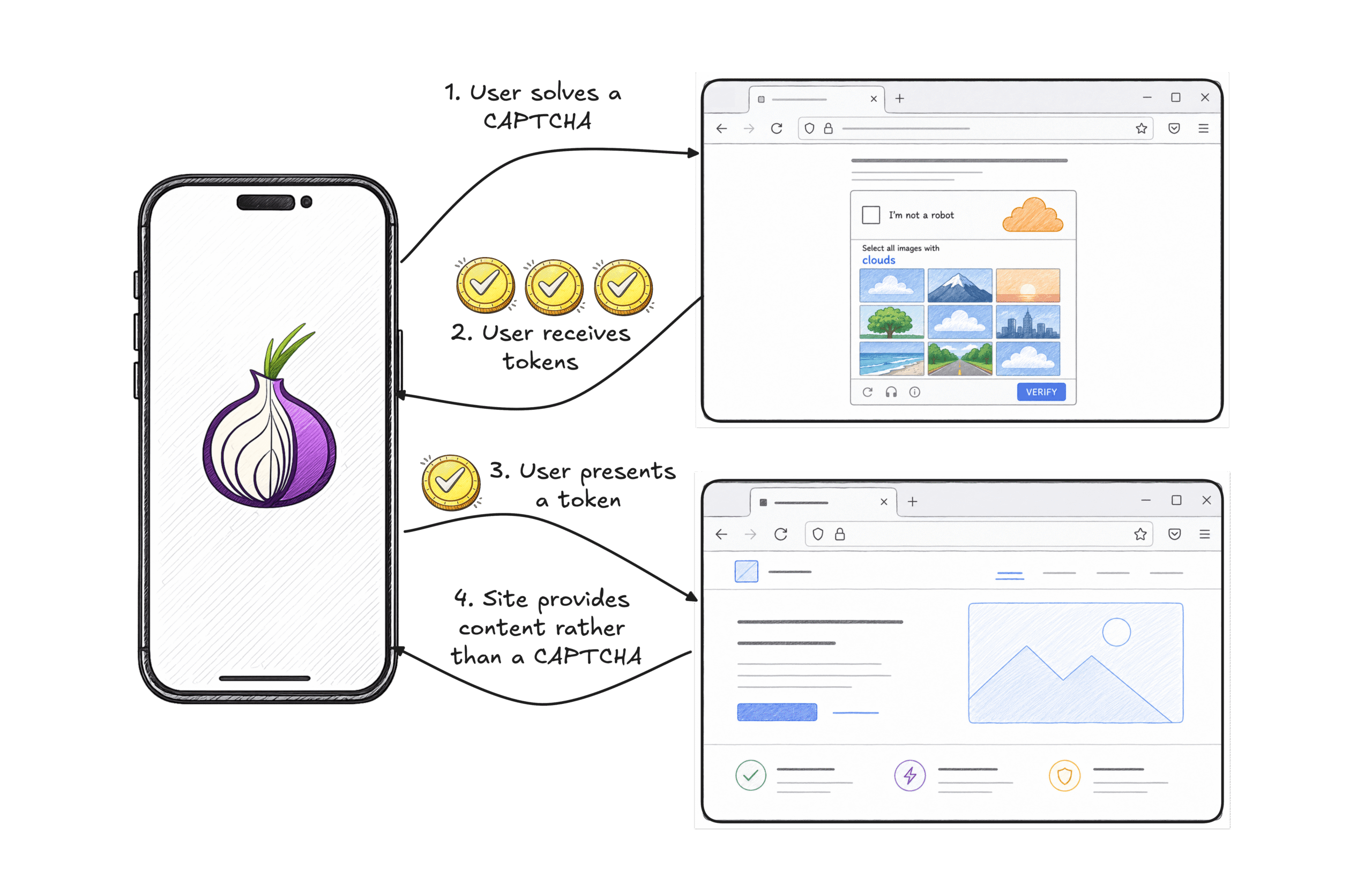
![]() Figure 1: In Privacy Pass, a CAPTCHA provider can issue tokens to a client which can then be used to bypass challenges for future site visits. Even if the CAPTCHA provider and sites collude, they can’t use the tokens to identify the user or their browsing history.
Figure 1: In Privacy Pass, a CAPTCHA provider can issue tokens to a client which can then be used to bypass challenges for future site visits. Even if the CAPTCHA provider and sites collude, they can’t use the tokens to identify the user or their browsing history.
Privacy Pass has gone on to be successfully deployed in systems where the issuer and verifier have a prior trust relationship: Apple uses it to authenticate users of Private Cloud Compute and Private Relay without linking their activity to their identity, Chrome uses it for two-hop IP protection, and Kagi uses it to provide private search. These deployments work in part because a small number of parties have agreed in advance on who issues tokens and who accepts them.
Applying this approach to an open system where any site can act as an issuer brings real challenges. Firstly, even though tokens are unlinkable, knowing a user has access to a specific issuer is a privacy leak on its own, because you can infer that the user meets the relevant issuance criteria. If one site can learn that you have a token from another site, that reveals that you have been to that site, which can be a major privacy problem. This compounds if sites can learn the set of issuers you have visited, since it becomes a fingerprint which can be used to identify you.
Generic techniques exist for proving a statement in zero knowledge: we can prove that a client has a token from a set of acceptable issuers without revealing which specific issuer it is. We’ll call this issuer blinding. The generic approach is often slow, but bespoke approaches tailored to the underlying cryptography can improve this considerably.
Another challenge is how sites using rate limits decide who to trust to issue tokens. If an issuer misbehaves then the site’s rate limits become ineffective, enabling volumetric abuse. However, if we need to prevent the site from learning which issuers a user has access to, the site is only going to know that one of its trusted issuers was used, not which one. This makes mistakes or misbehaviour by an issuer difficult to detect, and makes it hard for sites to evaluate new issuers. Solving this challenge is essential for openness. Without adequate information, sites are likely to lean towards conservative issuer selection. That could lead to less choice between Anchors, which in turn could lead to a new form of gatekeeper being created.
To solve this, sites at least need a way to calculate an aggregate score for each issuer they use. This should roughly correspond to how much of the traffic it considers abusive to have come from users using that particular issuer. Mozilla has long invested in systems like Prio which use multiparty computation (MPC) to protect user privacy whilst enabling aggregate measurements of system behaviour.
Privacy Pass also struggles to handle dynamic adjustments to rate limits. Once tokens have been issued, they’re difficult to invalidate without either revoking all active tokens or risking attacks which can compromise the privacy of users. It’s also beneficial if sites can adjust rate limits on a per client basis, for example by increasing rate limits where they become more confident the client is benign and withdrawing access when abuse is detected.
Anonymous Credit Tokens offer a useful building block to solve this problem. Conventional Privacy Pass schemes rely on issuing a bucket of tokens but ACT works differently by enabling the use of a credential with state. For example, an ACT credential can hold an internal counter. When the credential is presented, the site can check the counter is over some threshold and mutate it, increasing or decreasing the counter whenever the site’s perception of the holder has improved or worsened. Critically, the exact value is never leaked to the site, preventing the site from tracking the holder and ensuring successive presentations of the same credential can’t be linked.
Putting it together
So how can we combine these techniques to build a system which can enable privacy-preserving rate limiting on the open web? In May 2026, we participated in a W3C CG Meeting in collaboration with Cloudflare, Chrome and other web stakeholders in which we started sketching out a design we’re calling PACT – Private Access Control Tokens.
Rate limits need a starting point, a source of scarcity to anchor on. We’ll call an entity that provides such a source an Anchor. To a user who meets the Anchor’s criteria, like having a subscription, an account in good standing, or a verified phone number, an Anchor issues a batch of Endorsement tokens, following the Privacy Pass model. In practice, Anchors could be any website which has access to this kind of signal. An Endorsement conveys scarcity to other sites.
That’s enough for a simple system where access is either granted or denied. But as we discussed earlier, we also want the ability to increase access where a visitor behaves benignly and decrease it where they don’t. The state needed to enforce a rate limit can’t live in the Endorsement, because Endorsements cross trust boundaries between unrelated sites. We need a second object that can hold that state, scoped to the party that maintains it.
We’ll call that the party that handles rate limiting for a site a Moderator and the stateful object a Credential. A Credential is specific to a Moderator and, unlike endorsements, we limit each site to nominating a single Moderator. In the common case the site itself plays the Moderator role, so there’s no new entity or trust boundary. A Moderator can also be a third-party service shared across many sites, allowing those sites to cooperatively share a rate limit.
In the terminology of the previous section, the Anchor is the issuer of Endorsements, and the Moderator both verifies Endorsements and issues Credentials. A Moderator manages rate-limit policy: it decides which Anchors it trusts, accepts their Endorsements, and issues a Credential in return.
![]()
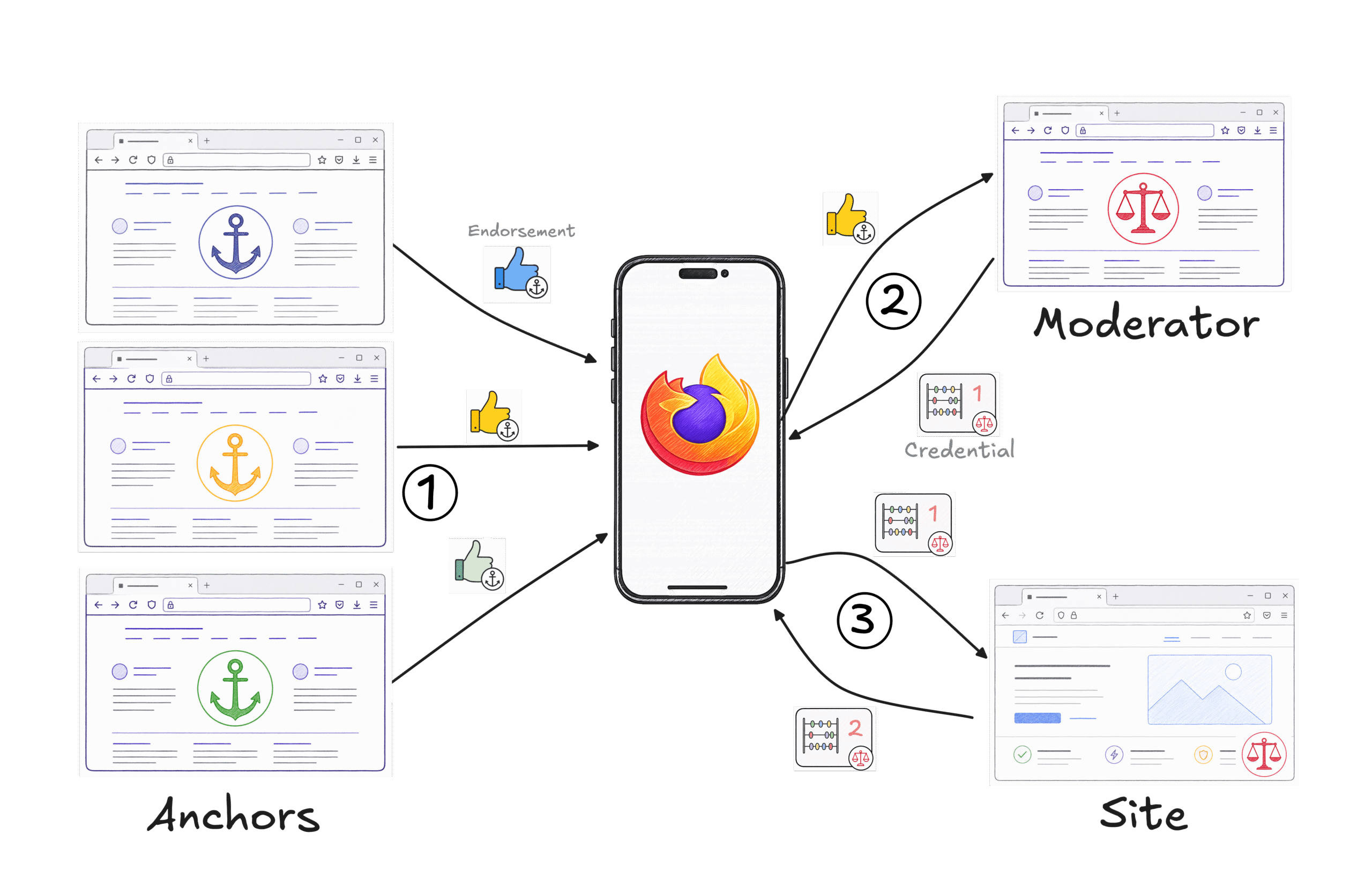
Figure 2: (1) Clients acquire Endorsements from Anchors in the course of normal browsing to sites they have relationships with. (2) Clients can exchange Endorsements for a stateful Credential from a Moderator. (3) Credentials can be used to access sites which use that Moderator. Credentials can be updated over time.
Directly revealing which Anchor backed an Endorsement would leak a lot of information about the user. The issuer blinding techniques from the previous section solve this: when an Endorsement is redeemed, the Moderator only learns that it came from one of the Anchors it trusts, but not which one.
When a Moderator covers more than one site, we let Credentials be presented across all of them but partition cookies and storage as we would for any other third party site. The unlinkability of Credential presentations keeps this from creating a new cross-site identifier. The benefit is that good behaviour on one site improves access on every site the Moderator covers, and bad behaviour cuts it everywhere. Websites can already build the same capability with a shared account system, so this doesn’t create a new way to lock users out, but it does provide a new way to grant access without requiring users to give up their privacy.
Enabling Moderators that cover many sites carries a centralisation risk, similar to the concentration we see today in anti-abuse providers. The mitigation is that the choice of Moderator stays with each site, and the choice of trusted Anchors stays with each Moderator. This can’t reverse the centralisation pressure the web already faces, but it ensures this system won’t lead to additional lock-in: a new Anchor or a new Moderator can be adopted without coordinating with a dominant vendor.
The system then has three flows. First, the user receives Endorsements from an Anchor in the course of normal interaction, based on the Anchor’s positive view of the user. This is a relatively rare operation for any given user and Anchor. After all, as our source of scarcity, Endorsements should not be too easy to accumulate.
![]()
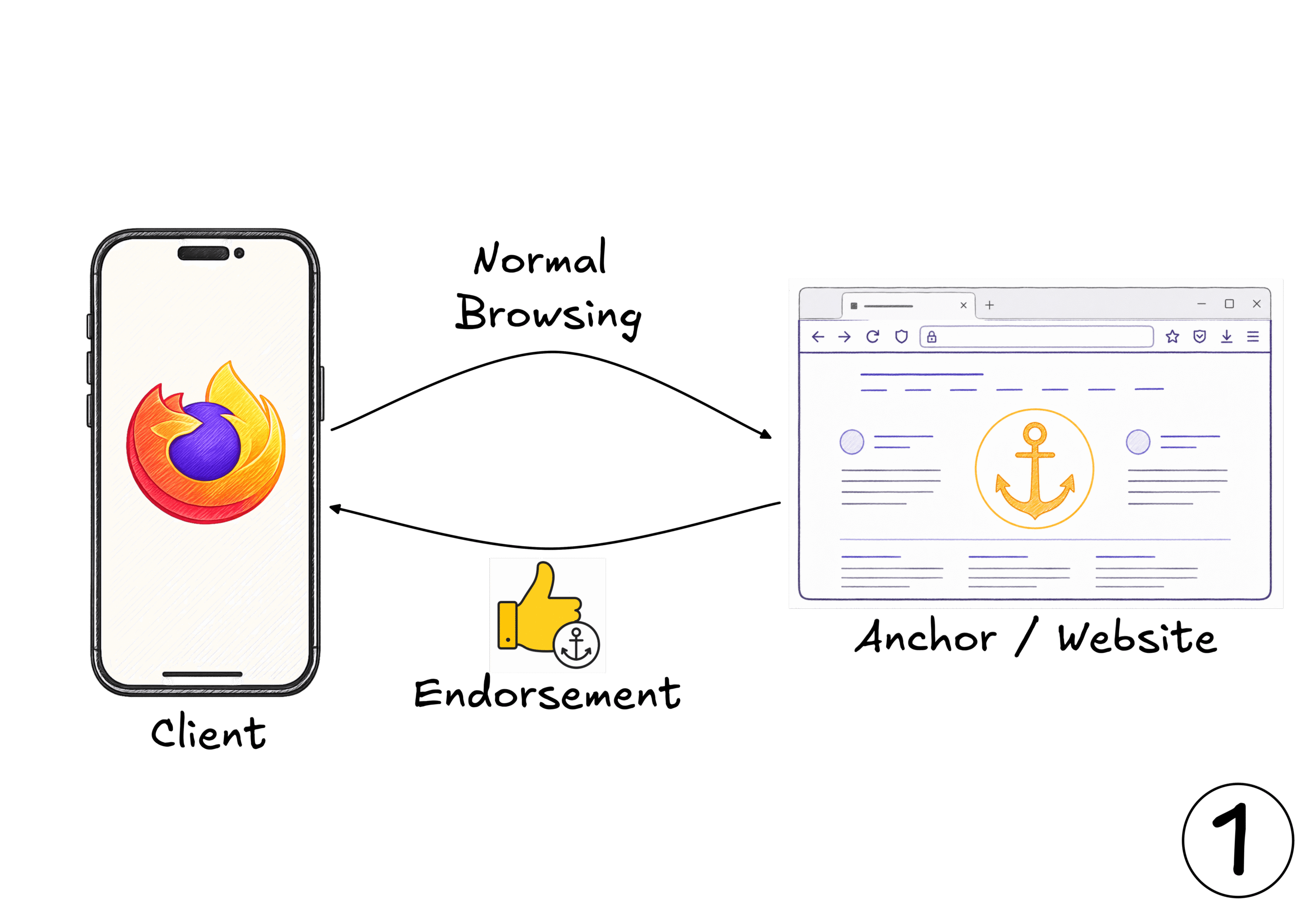
Figure 3: In the course of normal browsing, clients browse to websites they have a relationship with. These sites can act as Anchors by issuing Endorsements to clients.
Second, when the user arrives at a site that works with a Moderator, the browser spends an Endorsement from an Anchor the Moderator trusts and receives a Credential in return. The presentation hides which Anchor was used, and neither the Anchor nor the Moderator can trace the Endorsement back to where it was issued. The Moderator decides what initial balance the Credential starts with. If the user has no Endorsements from suitable Anchors at all, existing mechanisms (CAPTCHAs, account creation, federated login) could be used to bootstrap a Credential the same way, so the system degrades to today’s experience rather than locking the user out.
![]()
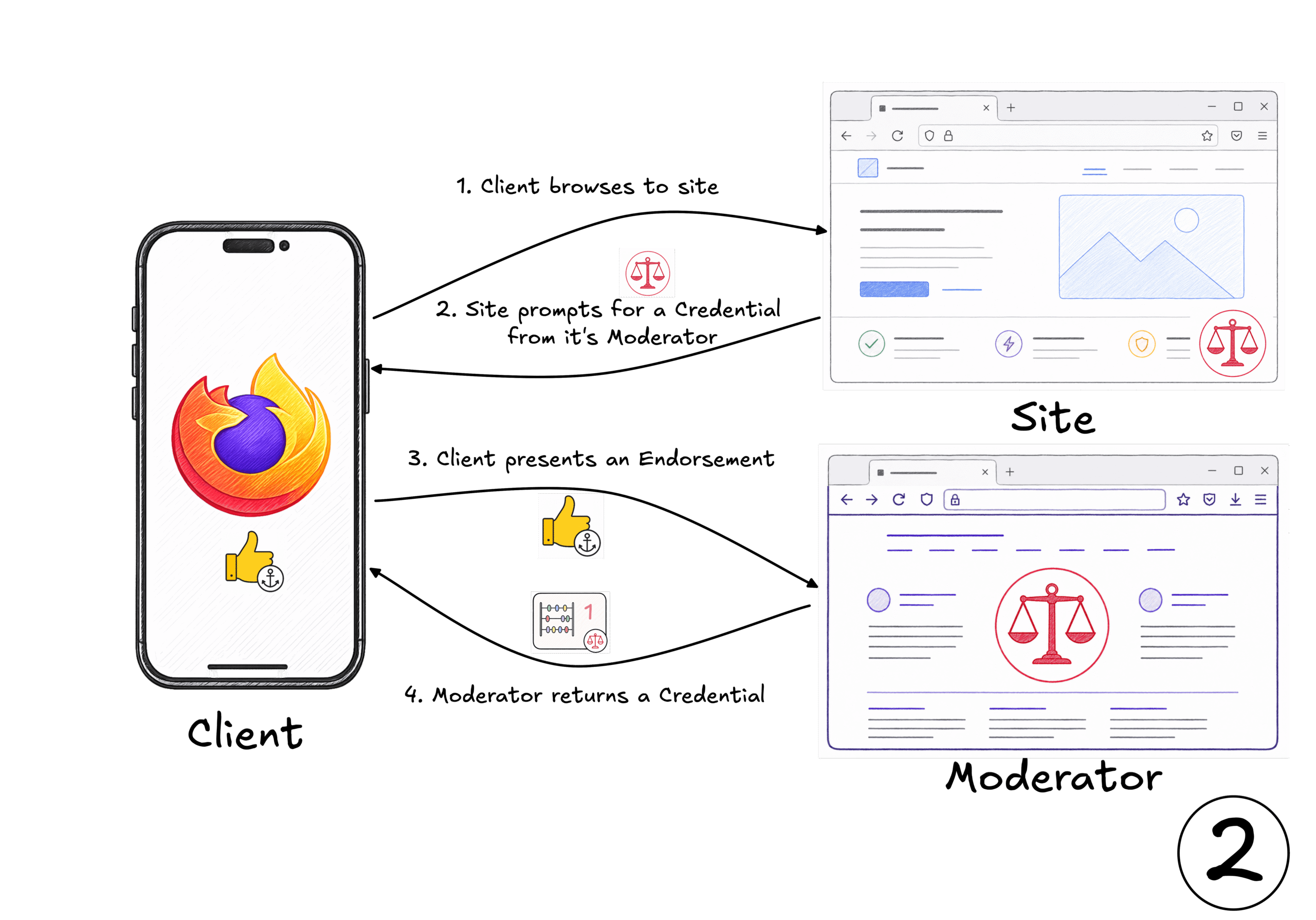
Figure 4: When the client browses to a site, it can prompt the client for a Credential from the Moderator it uses. If the Client doesn’t have a suitable Credential, but does have a suitable Endorsement, it can exchange it for a Credential with the Moderator. In practice, the Moderator and the Site might be the same server.
Third, as the user browses, the browser presents the Credential and the Moderator updates the internal state of the Credential. The Moderator can reward behaviour that looks benign and penalize suspicious activity, but can’t track the use of the Credential or identify it if it’s used on other sites the Moderator covers. Revocation falls out of the same mechanism: a Moderator can refuse to return an updated Credential.
![]()
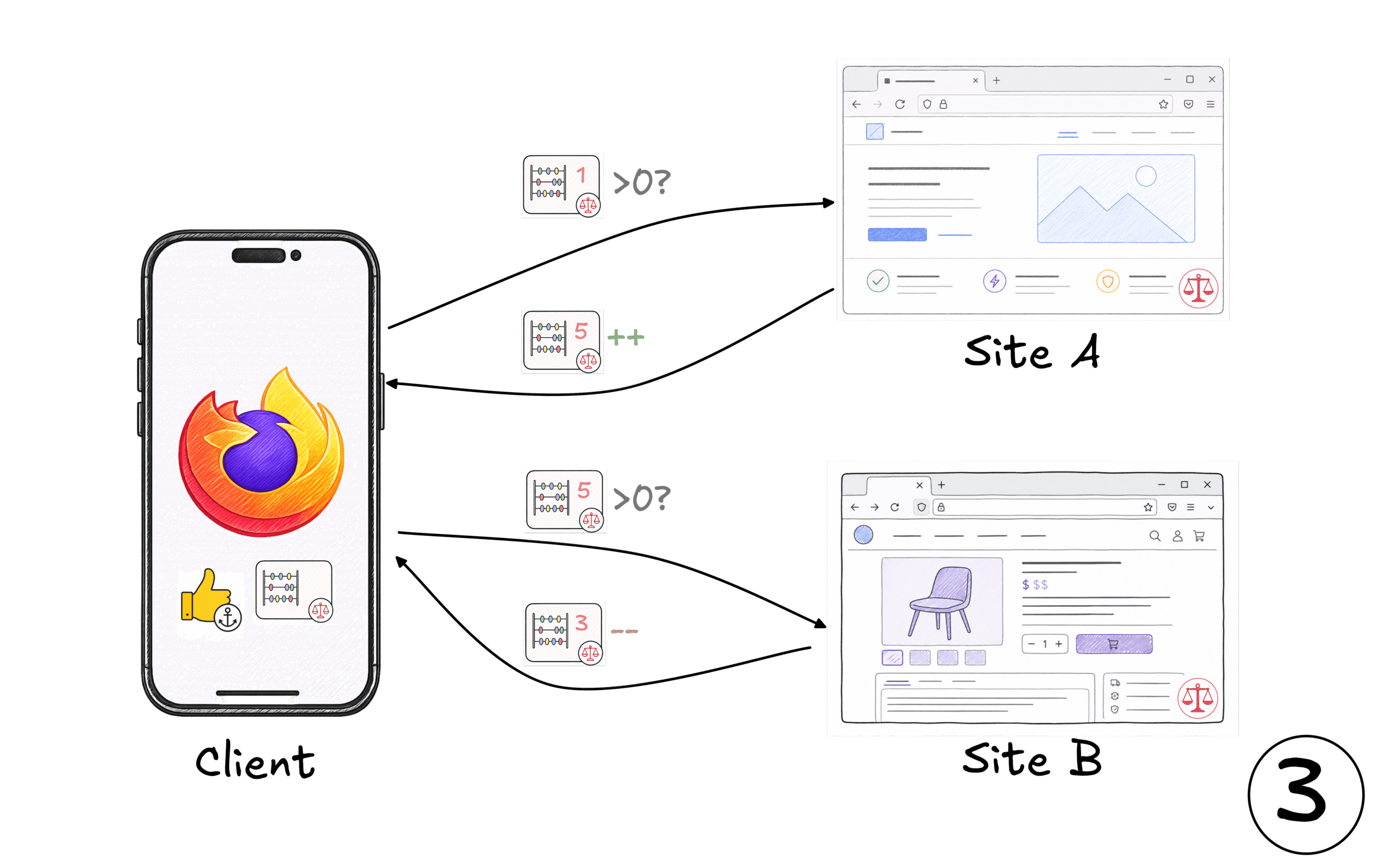
Figure 5: The Client can present the Credential on sites which use the matching Moderator. Sites can check if the Credential is in good standing. The sites can then adjust the access the Credential has in response to behaviour. E.g. increasing it when they gain confidence in the client or reducing it in response to malicious behaviour.
In practice, all of this would happen transparently to the user through a WebAPI that sites acting as Anchors or Moderators would call from JavaScript. In an ideal ecosystem, users would accumulate Endorsements through normal browsing, just by virtue of the sites they already visit, and the rest of the flow would happen in the background as they move around the web, leaving users with meaningfully less friction.
AI agents acting on behalf of a user slot into the same flow. An agent can carry its user’s Credentials, in which case the user remains accountable for how the agent behaves. Sites would not need to grant any more access than they would to the user themselves. Alternatively, the operator of an agent can run its own Anchor and vouch for its agents the way other Anchors vouch for human users. Sites retain control over which Anchors they accept, so they can choose how to treat agent traffic without needing a separate detection mechanism.
Several mechanisms combine to keep the information about a user that flows out close to a single bit. Cryptographic unlinkability ensures successive Credential presentations cannot be tied to each other or to the original issuance, so a user’s visits cannot be joined into a history. Each site is bound to a single Moderator, so the set of Moderators a user has Credentials with never becomes a cross-site fingerprint. The Anchor-to-Credential exchange happens in an isolated browsing context, so during ordinary browsing the only thing the site or its Moderator ever observes is a Credential presentation: the site only learns if the user has a valid Credential below the rate limit, or nothing. When the Moderator updates a Credential, it adjusts the credentials state without learning what it is.
The additional privacy given to users from Issuer blinding makes participating in the system more challenging for Moderators. Because the Moderator can’t see which Anchor backed a Credential at issuance, it can’t give a Credential from a strong Anchor more access than one from a weak Anchor: doing so would itself leak which Anchor was used. The initial access has to be uniform across the Moderator’s whole pool of Anchors, which in practice means setting it at the strength of the weakest. However, this is only relevant for that initial access, the Moderator can update credentials according to the holder’s behavior, enabling Credential’s to accrue access over time.
Building an open ecosystem also requires that sites can make effective decisions about the Anchors they choose to trust. Multiparty computation systems like Prio enable aggregate scoring without compromising privacy. When users present Credentials, they can provide an encrypted share which identifies the anchor they used and can be privately aggregated to compute the quality of an issuer.
Next Steps
We think the architecture we’ve sketched for PACT has the right shape, but many of the details still need to be worked out and the entire system needs rigorous privacy and security analysis.
We want to do that work in the open. The IETF is the natural venue for the cryptographic protocols underneath, and the W3C for the WebAPI surface that sits on top. We’ll be bringing draft specifications to these bodies as soon as they’re ready, and we welcome collaborators from across the ecosystem: browser vendors, site operators, anti-abuse providers, and the cryptography community.
If successful, we think we can provide a system which will keep the web open and private, while still giving sites the rate-limiting signal they need.
Acknowledgements
The ideas described here are the result of collaboration and conversations with many people, including: Watson Ladd, Thibault Meunier, Michele Orrù, Trevor Perrin, Eric Rescorla, Samuel Schlesinger, Martin Thomson, Eric Trouton, Benjamin Vandersloot & Cathie Yun.
[1] PAT requires that the source of scarcity and an independent issuer be trusted not to collude. If they do, they can track users as they interact with the system. This is not suitable in the context of an open system where any party could play those two roles.
The post PACT: Anonymous Credentials for the Web appeared first on Mozilla Hacks - the Web developer blog.








 Survey link
 Ingredients
 Instructions
 Tips
Tips Nutrition